What it is
Four claims, and everything else follows.
You build the vocabulary. The graph is what it makes visible.
Yours to control
Private, friends, or public, per lens, with named invites — and a node-level restriction that overrides all of it. The boundary is enforced underneath the interface, so a restricted node never reaches a hosted model. You decide what is visible, one node at a time, and nothing else decides it for you.
Readable structure
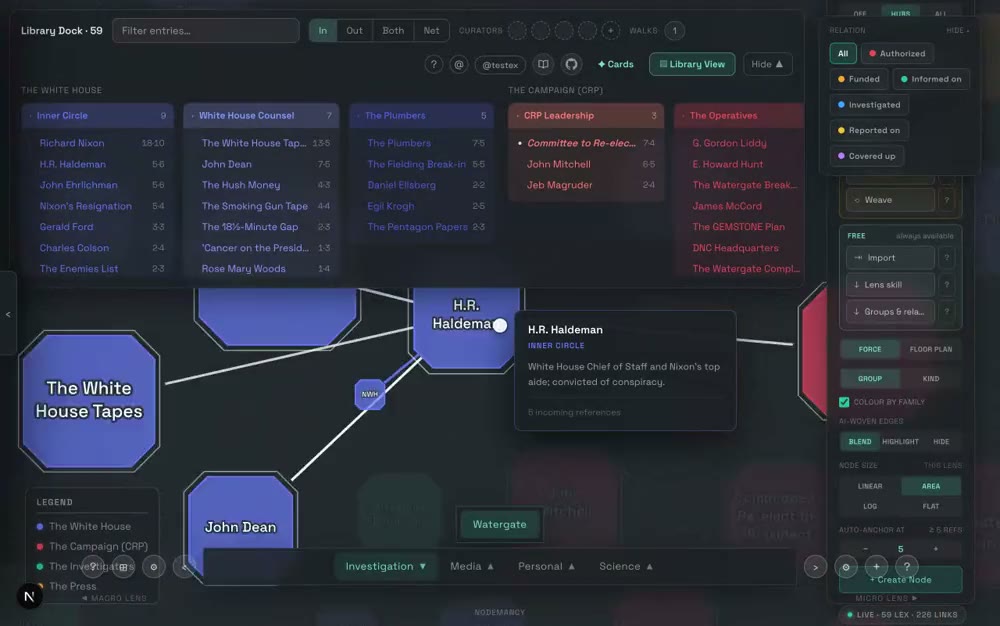
You decide what counts as a thing and what counts as a link — a lens carries its own vocabulary of kinds, relations and groupings, and the graph is what that vocabulary makes visible. It is your dictionary before it is your diagram. And because the structure is declared rather than guessed, it can be drawn as a floor plan: every group a room, sized by what is in it, with doors where the rooms actually connect.
In and out
No plugins. One click gives you the whole palace as markdown — entries, taxonomy, routes, review schedules — in the same layout the sync writes, so it goes back in as easily as it came out. And nodes can arrive from whatever assistant you already use: download the lens so it knows your vocabulary, write with it, paste the result back. No API key, because the app never calls a model on your behalf — you do.
Our commitment
Every feature here exists because it was needed. Your data leaves in one click, your account deletes on the spot, and nothing you mark restricted ever reaches a model. That is how this is run, and what comes in goes back into running it that way.
See it
A body of work, and where it came from.
Both clips are the running application, recorded by a script rather than staged — so when the app changes, they get re-shot rather than quietly going out of date. The second one is the part that surprises people: paste what an AI wrote you, fences and small talk included, and get a structured lens out of it.
Get it running
Use the assistant you already pay for.
There is a whole lane here that needs no key, no subscription upgrade and nothing metered: your own desktop model writes the files, and one command reads them in. An assistant that can read and write files on your own machine — and a local copy of your graph for it to write into.
Make the vault
A vault is a folder. No database to provision, no proprietary format — the graph is a directory of markdown files you own, readable without us.
mkdir -p ~/Developer/your-graph/lexicon/physicsThe shape it takes
One folder per lens. A file named _lens.md defines the taxonomy; every other file is an entry. This part is identical on all three platforms — only the path separator differs.
Define the lens
_lens.md is the reading: families, the groups inside them, and the kinds of relation edges may carry. Colours here are what the graph draws with.
---title: Physicsauthority: vault---# Physics## Families<!-- key | Label | color -->- mechanics | Mechanics | #6478f5- fields-waves | Fields & Waves | #2dcca0## Groups<!-- key | Label | color | family -->- dynamics | Dynamics | #5a6fe0 | mechanics- electromagnetism| Electromagnetism | #2dd4c8 | fields-waves## Relations<!-- value | Label | directed|symmetric | color -->- derives-from | Derives from | directed | #6478f5- generalizes | Generalizes | directed | #2dcca0
Write an entry
An entry names its group and links out with wikilinks. `::relation` is what types the edge — it has to be one of the relations the lens declared. The pipe is only the label you want to read; a link with a pipe and no `::` is a plain, untyped connection.
---title: "Magnetic Field"type: lexicon-entrygroup: electromagnetismkind: quantity---# Magnetic Field**Definition.** The field exerting force onmoving charges and currents.Unified with electricity by[[maxwells-equations::generalizes|Maxwell's Equations]].
Get the sync tool, and sign in
Sync runs on your machine and writes to your account — you sign in with a code emailed to you, once. Your notes go from your folder to your graph; nothing is stored on our side that isn't already in your palace.
git clone https://github.com/jdejonge206/Nodemancy-Public.gitcd Nodemancy-Public/backend && npm installSync
One command reads the whole folder in. The first run asks for your email and a one-time code; every run after that is silent.
npm run syncOr let an assistant do all of it
Every step above is file work, which means a model with filesystem access can do it for you. Download the authoring skill, hand it to the model, and describe the lens you want.
- Claude Desktop + Desktop CommanderAn MCP server that gives the desktop app real filesystem and shell access.
- Claude CodeTerminal-native; already has the filesystem and can run the sync itself.
- ChatGPT desktop + Desktop CommanderSame MCP server, different host app.
- —No API key, and nothing metered — the model doing the work is one you already pay for.
- —The files are yours before they are ours. You review markdown in your own editor, not model output in someone's web form.
- —It works today, on all three platforms, with no account upgrade.
Asking is live
Ask the palace. Then edit it back.
A graph gets hard to hold in your head at roughly the size it starts being worth having. The answer to that is not a better map — it is being able to ask a question, and to have the answer point back at the nodes it came from.
- —Answers cite the node they came from, so you can follow one back and check it rather than take it on faith.
- —Ask inside one lens or across the whole palace — the scope of the question is yours to set.
- —Anything you have marked restricted never reaches a hosted model. That floor is enforced underneath, not in the interface.
Editing back is not built yet. Asking is — everything above it works today. What is missing is the return trip: restating a claim across forty nodes at once, or rewriting a lens in a different register, without opening forty editors. It sits under “real, not scheduled” on the roadmap, with the reason it is not sooner written next to it.
See the roadmapOn the way
Mobile, for the half that travels.
Reading, reviewing drafts and running cards work well on a phone. Authoring a lens does not, and this will not pretend otherwise at launch — the roadmap says exactly that, in writing.
Changelog
What shipped, dated.
An edge that spans several levels goes around the rows between
A paste's links resolve whichever order you wrote them in
An empty hierarchy chart says which thing is missing
Effective ownership, read beside the chart
Roadmap
What’s being built.
The workshops
A first-run experience designed on purpose
Carry a reading across to the canvas
Pricing
Usable without a mouse, and without seeing the graph
Everything else
Documents, and somewhere to ask.
Resources
The documents that say what happens to your work.
- Terms of serviceWhat you agree to.
- Privacy policyImmediate irreversible deletion, a full export, and a floor no restricted node crosses.
- Export your dataA full archive of everything you've written, exercised end to end.
Plan
Nodemancy is free to use, and nodes and lenses are never capped. A subscription covers hosted AI — asking questions of your own graph, and assisted generation — which costs real money per request to run. You can also bring your own key instead, for nothing.
Contribute
Nodemancyis free while it's being built. If it's useful to you, you can chip in — it goes to hosting and the model costs, and it isn't tied to your account in any way.